If you spend as much time as I do in the terminal, you probably depend on your shell history too.
Being able to repeat a complex command that you remember you typed a month ago, is extremely
valuable —no wonder why I’ve set HISTSIZE=10000.
While it is convenient to use your shell history as part of your long term memory, the downside is things
that shouldn’t be there, end up there: A command you prepended with API_KEY=..., a quick and dirty
curl --user "name:password", a PGPASSWORD=... psql, an ALTER USER USER() IDENTIFIED BY ...,
and so on. And they are all probably saved in shell or app history file.
This is not good, obviously. Credentials should not be saved in places where a malicious program can just read them, and they should not be preserved in backups.
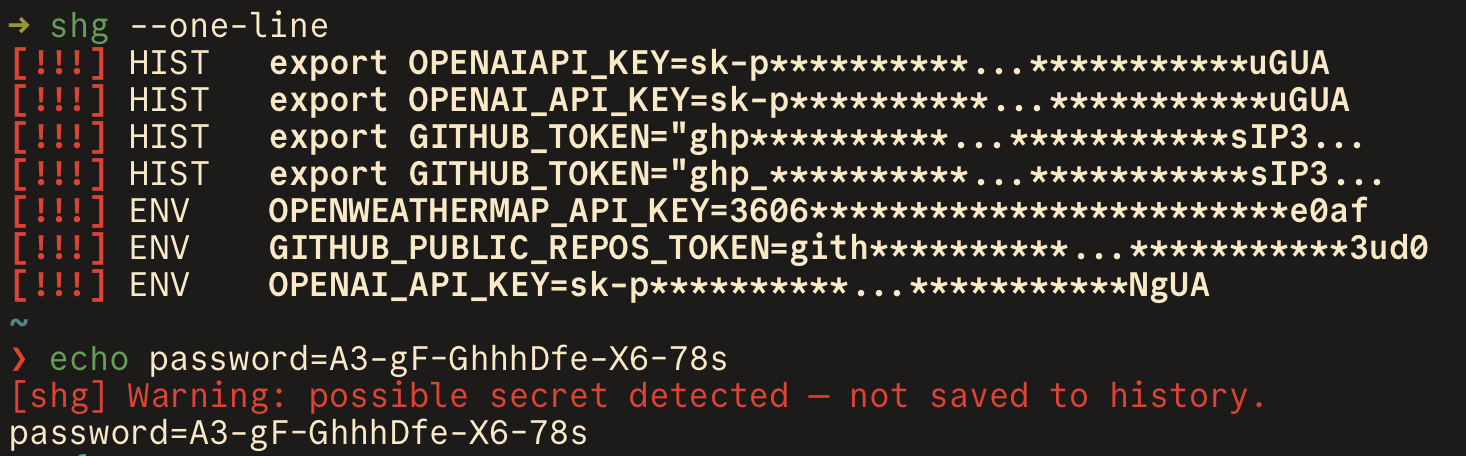
That’s why I built shg (short for SHell Guard), a small program
that scans my shell history (and other history files) for entries that look like API keys, passwords,
bearer tokens, credential URLs, and private keys and alerts me.
I’ve set it up to do a quick scan when I start a new shell
and (I think this is the coolest part) also check every command I enter in zsh and
catch secrets before they ever land in ~/.zsh_history.
Some tips:
- run
shg-config discoverto find and configure history files that are not part of the default scan list. - you can adjust the output and the severity level using
--level,--one-line,--jsonand other options. Checkshg scan --helpfor more details. - If you keep getting reports for entries that you don't mind, add them to
~/.config/shg/ignore.local.shg. (See the default ignore file here).
If you use shg and you like it, give it a star on GitHub! 🙏